Responsive Website Design: Key Components and How to Use Them
Explore the essential elements of responsive web design, including flexible layouts, mobile-friendly navigation, responsive images, and performance optimization.
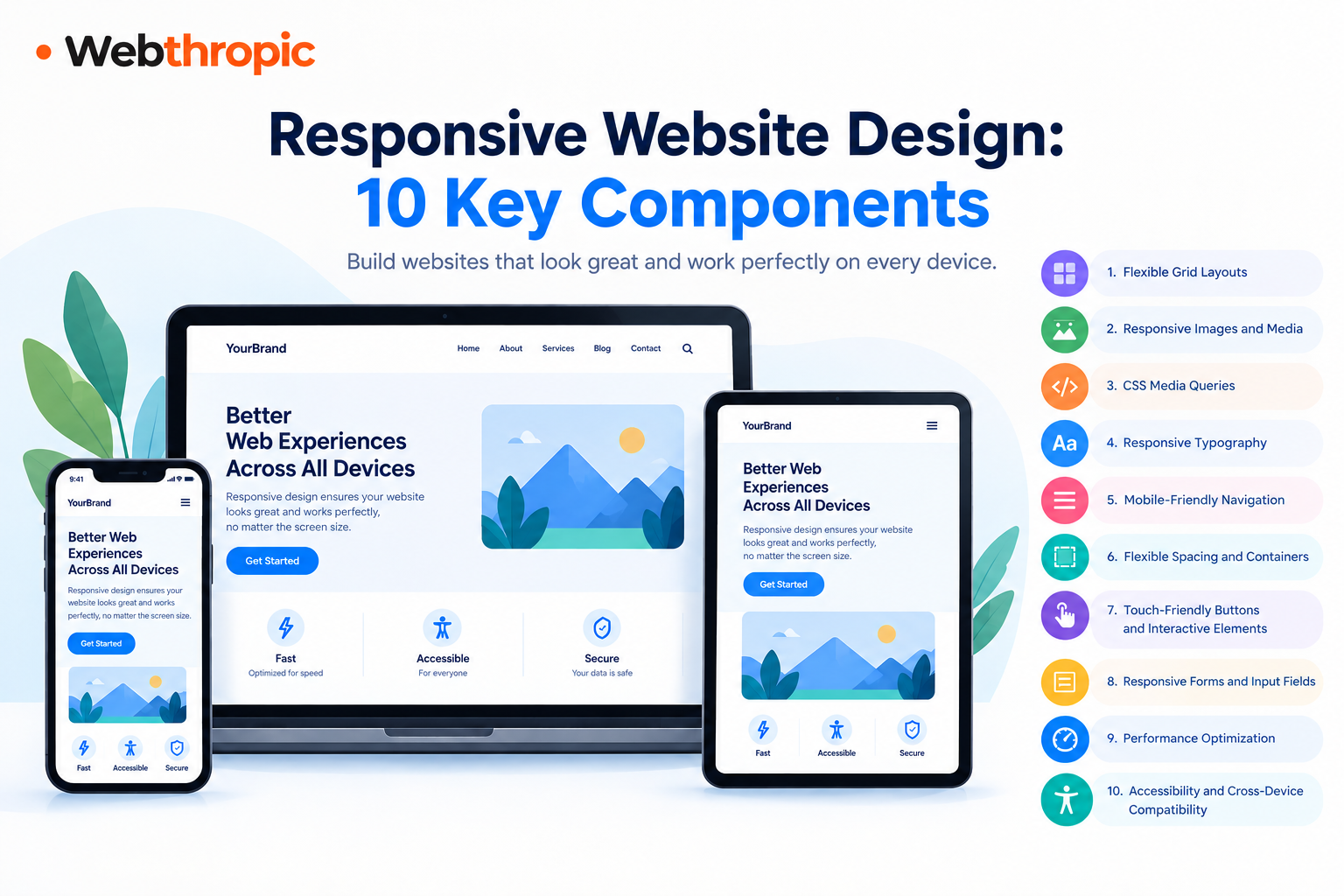
In today's digital world, people visit websites using smartphones, tablets, laptops, and desktop computers. A website that looks attractive on a desktop may become difficult to use on a mobile screen if it is not designed properly. This is where responsive website design becomes important.
Responsive website design helps a website automatically adjust its layout, images, text, navigation, and other elements according to the screen size and device being used. It provides visitors with a consistent and comfortable browsing experience, regardless of how they access the website.
For businesses, responsive design is more than a visual improvement. It can support better user engagement, easier navigation, stronger brand credibility, and improved opportunities for generating leads and sales.
In this guide, we will explore the key components of responsive website design, explain how to use them effectively, and discuss practical techniques for building websites that work smoothly across different devices.
What Is Responsive Website Design?
Responsive website design is an approach to web development that allows a website to adapt to different screen sizes, resolutions, and devices. Instead of creating separate websites for desktop and mobile users, developers build a flexible layout that responds to the available screen space.
For example, a desktop website might display three product cards in a single row. On a tablet, the same cards may appear in two columns, while on a smartphone, they may stack vertically to make the content easier to read.
Responsive design generally combines flexible layouts, CSS media queries, scalable images, and adaptable typography to create a consistent user experience.
Why Is Responsive Website Design Important?
A responsive website offers several benefits:
- Better mobile usability: Visitors can browse pages without constantly zooming in or scrolling horizontally.
- Improved user experience: Content remains readable, and important features are easier to access.
- Consistent branding: The website maintains a professional appearance across different devices.
- SEO support: Mobile-friendly usability helps support a positive search experience, although responsive design alone does not guarantee higher rankings.
- Better conversion opportunities: Accessible forms, clear buttons, and easy navigation can help visitors complete important actions.
- Simplified maintenance: A single responsive website is generally easier to maintain than separate desktop and mobile versions.
How to Improve Accessibility and Compatibility
- Use semantic HTML elements.
- Provide meaningful alternative text for informative images.
- Maintain sufficient text and interface contrast.
- Ensure interactive elements are keyboard accessible.
- Use visible focus indicators.
- Associate form labels with their inputs.
- Avoid relying on colour alone to communicate information.
- Test layouts in multiple browsers and viewport sizes.
- Ensure content does not require horizontal scrolling at common mobile widths, except where it is genuinely necessary, such as certain data tables.
How to Build a Responsive Website Step by Step
Understanding the components is useful, but applying them in the correct order makes the development process more effective.
Step 1: Start With a Mobile-First Approach
Design the smallest practical layout first. Prioritize essential content, simple navigation, readable typography, and the most important user actions.
Then progressively enhance the design for tablets and desktops.
Step 2: Plan the Content Structure
Organize pages into meaningful sections, such as headers, navigation, hero areas, service descriptions, product grids, testimonials, and contact forms.
Decide which content must appear first and how it should rearrange on smaller screens.
Step 3: Create Flexible Layouts
Use CSS Grid and Flexbox to manage columns, rows, alignment, and spacing. Avoid relying on rigid dimensions that could cause overflow.
Step 4: Add Breakpoints Where Necessary
Resize the browser and identify where the design begins to break down. Introduce media queries to adjust navigation, columns, typography, and spacing.
Step 5: Optimize Media and Performance
Resize images for their intended use, reduce unnecessary scripts, and test page loading performance.
Step 6: Test on Multiple Devices
Check the website on smartphones, tablets, laptops, and larger desktop displays. Browser developer tools can simulate different screen sizes, but real-device testing is also valuable.
Step 7: Review Accessibility and Functionality
Test keyboard navigation, form submission, button interactions, image alternatives, text contrast, and mobile menus.
Step 8: Monitor and Improve
After launch, review user feedback, analytics, search performance, and Core Web Vitals. Improve the parts of the website where visitors encounter friction.
Conclusion
Responsive website design is an essential part of modern web development. It combines flexible layouts, responsive images, media queries, readable typography, mobile-friendly navigation, adaptable forms, performance optimization, and accessibility to create a consistent browsing experience across devices.
The most effective approach begins with mobile-first planning, uses flexible CSS techniques, and includes regular testing across screen sizes. Developers should also pay attention to website speed, content hierarchy, touch interactions, and accessibility.
For businesses, these improvements can create a more professional online presence and make it easier for visitors to find information, explore services, and complete important actions.
Whether you are building a new website or updating an existing one, focusing on these key components will help you create a flexible, user-friendly website that is prepared for the needs of modern users.
