Types of Keys in DBMS: Primary, Candidate, Super, Foreign and Composite Key with Examples
Definition, all different keys in DBMS, and solved examples for exams and interviews
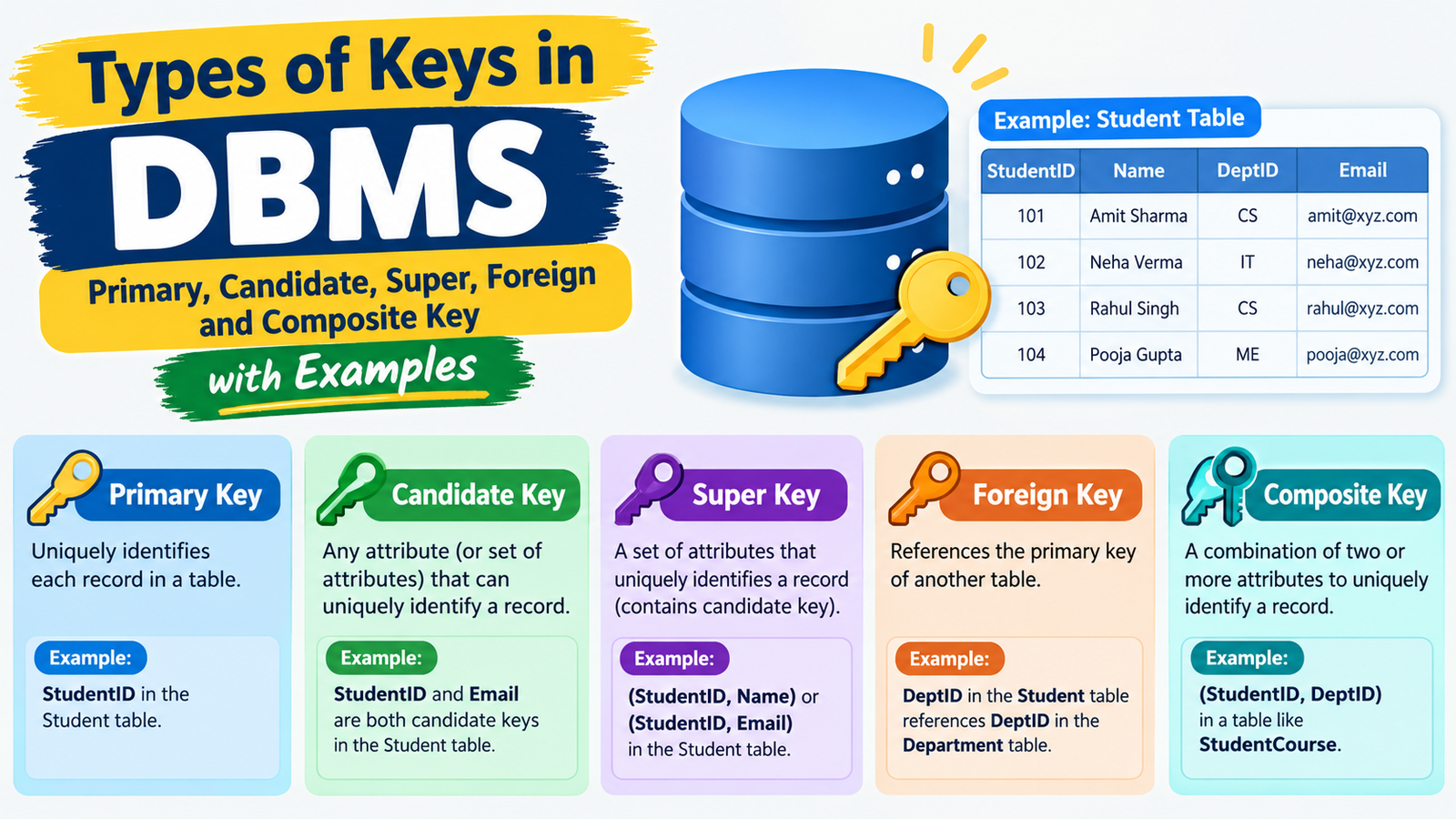
What Are Keys in DBMS? Definition and Concept of Keys in DBMS
Keys in DBMS are columns (attributes) that uniquely identify each row in a table. The definition of keys in DBMS is simple: a key is a column, or a set of columns, that tells one record apart from every other record. Keys also link tables together, which is why they are called relational keys in DBMS. The main types of keys in DBMS are the primary key, candidate key, super key, composite key, foreign key, unique key, and surrogate key.
Why Keys Are Important in DBMS
- Unique identification: a primary key in DBMS makes sure no two rows are the same.
- No duplicate data: a unique key in DBMS rejects repeated values like email or phone number.
- Links tables: a DBMS foreign key connects one table to another.
- Faster searching: primary keys are indexed automatically.
- Supports normalization: keys are needed for normalization in DBMS (2NF, 3NF).
Keys and Data Consistency in DBMS (with Example)
Data consistency in DBMS means data stays valid and accurate across all tables. Keys enforce this.
| Dept_ID (PK) | Dept_Name |
|---|---|
| D1 | Computer Science |
| D2 | Mechanical |
| Roll_No (PK) | Name | Dept_ID (FK) |
|---|---|---|
| 101 | Amit | D1 |
| 102 | Riya | D2 |
If you try to add a student with Dept_ID = D9, the database rejects it because D9 does not exist in the Department table. The foreign key blocks invalid data and keeps the tables consistent.
Keys in Relational Database Management System (RDBMS)
In an RDBMS such as MySQL, PostgreSQL, Oracle, and SQLite, every table has an RDBMS primary key, and tables connect through foreign keys. For example, the primary key in MySQL database tables is often an auto-increment ID.
sql
CREATE TABLE Student ( Roll_No INT PRIMARY KEY, Email VARCHAR(80) UNIQUE, Dept_ID VARCHAR(5), FOREIGN KEY (Dept_ID) REFERENCES Department(Dept_ID) );
Here Roll_No is the primary key, Email is a unique key, and Dept_ID is a foreign key.
All Types of Keys in DBMS (Different Keys in DBMS at a Glance)
There are 10 different types of keys in DBMS. Each key has a specific job: identifying rows, linking tables, or preventing duplicate data. The main types of keys in DBMS are the super key, candidate key, primary key, alternate key, unique key, foreign key, composite key, secondary key, surrogate key, and partial key.
Key Types in DBMS Comparison Table
| Key Type | Meaning | Allows NULL? | Allows Duplicates? | Example (STUDENT table) |
|---|---|---|---|---|
| Super Key | Any set of columns that uniquely identifies a row | Depends | No | {Roll_No}, {Roll_No, Name} |
| Candidate Key | Minimal super key (no extra column) | Depends | No | Roll_No, Email |
| Primary Key | Candidate key chosen to identify rows | No | No | Roll_No |
| Alternate Key | Candidate key not chosen as primary key | Depends | No | |
| Unique Key | Column that must have unique values | Yes (one NULL in most databases) | No | Phone |
| Foreign Key | Column that refers to the primary key of another table | Yes | Yes | Dept_ID |
| Composite Key | Primary key made of two or more columns | No | No (as a combination) | {Student_ID, Course_ID} |
| Secondary Key | Column used only for searching (indexing) | Yes | Yes | Name |
| Surrogate Key | System-generated artificial key with no business meaning | No | No | Auto-increment ID |
| Partial Key | Part of the key of a weak entity in an ER diagram | No | Yes (alone) | Dependent_Name |
Relational Keys in DBMS
Relational keys in DBMS are the keys that define how data is identified and connected inside a relational database. They fall into three groups:
- Identifying keys: super key, candidate key, primary key, alternate key, composite key. These find a row uniquely.
- Linking keys: foreign key. This connects one table to another and maintains referential integrity.
- Support keys: unique key, secondary key, surrogate key, partial key. These prevent duplicates, speed up searches, simplify design, or support weak entities.
How they relate to each other:
Super Key └── Candidate Key (minimal super key) ├── Primary Key (chosen one) └── Alternate Key (the rest)
Every primary key is a candidate key, and every candidate key is a super key, but the reverse is not true. This relationship is the most asked question on keys in DBMS in exams and interviews.
Super Key in DBMS with Example
A super key in DBMS is a set of one or more columns that can uniquely identify every row in a table. It may include extra columns that are not needed for uniqueness. Every candidate key and every primary key is also a super key, which makes it the widest key type among all types of keys in DBMS.
Super Key Database Definition
In a super key database definition, a super key is any attribute set that guarantees no two rows have the same combination of values. Adding more columns to a super key still gives a super key, so one table can have many of them.
Super key in DBMS with example (STUDENT table):
| Roll_No | Name | Phone | |
|---|---|---|---|
| 101 | Amit | amit@mail.com | 98100001 |
| 102 | Riya | riya@mail.com | 98100002 |
| 103 | Amit | amit2@mail.com | 98100003 |
Valid super keys:
- {Roll_No}
- {Email}
- {Phone}
- {Roll_No, Name}
- {Roll_No, Email}
- {Name, Email}
- {Name, Phone}
Not a super key:
- {Name}, because two students are named Amit.
In {Roll_No, Name}, the Name column is extra because Roll_No alone already identifies the row. That is why it is a super key but not a candidate key.
How to Find All Super Keys in a Relation
Follow these steps for any relation:
- List all attributes. Example: R(A, B, C, D).
- Find the candidate keys first. These are the smallest attribute sets that uniquely identify a row. Suppose A is the only candidate key.
- Add the other attributes to each candidate key in every possible combination. Each result is a super key.
- Count the super keys. For one candidate key with n total attributes, the number of super keys is 2^(n-1).
Example: R(A, B, C, D) with candidate key A.
Super keys are every set that contains A:
{A}, {A,B}, {A,C}, {A,D}, {A,B,C}, {A,B,D}, {A,C,D}, {A,B,C,D}
Count = 2^(4-1) = 8 super keys.
For more than one candidate key, count the sets that contain at least one candidate key, using inclusion-exclusion so overlapping sets are not counted twice.
Quick rule: a set of attributes is a super key if its closure contains all attributes of the relation.
Candidate Key in DBMS with Example
A candidate key in DBMS is a minimal super key: a column or set of columns that uniquely identifies each row, with no extra column that can be removed. A table can have more than one candidate key, and the primary key is chosen from among them.
Candidate key in DBMS with example (STUDENT table):
| Roll_No | Name | Phone | |
|---|---|---|---|
| 101 | Amit | amit@mail.com | 98100001 |
| 102 | Riya | riya@mail.com | 98100002 |
| 103 | Amit | amit2@mail.com | 98100003 |
Candidate keys: Roll_No, Email, Phone. Each one alone identifies every row.
Not a candidate key: {Roll_No, Name}. It is a super key, but Name is extra, so it is not minimal.
Minimal Key in DBMS
A minimal key in DBMS is a key where removing any attribute breaks uniqueness. This is the idea that separates a candidate key from a super key.
- {Roll_No} is minimal, because removing Roll_No leaves nothing.
- {Roll_No, Name} is not minimal, because removing Name still leaves a unique key.
Candidate Keys in a Database: Rules and Properties
- Unique: no two rows can have the same candidate key value.
- Minimal: no attribute can be removed without losing uniqueness.
- Multiple allowed: one table can have many candidate keys in a database.
- Can be composite: a candidate key can have more than one column, such as {Student_ID, Course_ID}.
- NULL values: a candidate key chosen as primary key cannot be NULL. Others may allow NULL, depending on the database.
- Stable values: values should rarely change over time.
- Relation to other keys: one candidate key becomes the primary key, and the rest become alternate keys
Primary Key in DBMS with Example
Define Primary Key in DBMS
To define primary key in DBMS: a primary key is the candidate key chosen to uniquely identify each row in a table. It cannot contain NULL values or duplicates, and a table can have only one primary key.
Primary key in DBMS with example:
| Roll_No (PK) | Name | |
|---|---|---|
| 101 | Amit | amit@mail.com |
| 102 | Riya | riya@mail.com |
Roll_No is the primary key. Inserting another row with Roll_No = 101, or with an empty Roll_No, is rejected.
Primary Key in MySQL Database and PostgreSQL
Primary key in MySQL database:
sql
CREATE TABLE Student ( Roll_No INT AUTO_INCREMENT PRIMARY KEY, Name VARCHAR(50), Email VARCHAR(80) );
Primary key in PostgreSQL:
sql
CREATE TABLE Student ( Roll_No SERIAL PRIMARY KEY, Name VARCHAR(50), Email VARCHAR(80) );
Add a primary key to an existing table:
sql
ALTER TABLE Student ADD PRIMARY KEY (Roll_No);
MySQL uses AUTO_INCREMENT, while PostgreSQL uses SERIAL (or GENERATED ALWAYS AS IDENTITY) to generate values automatically.
RDBMS Primary Key Rules
The RDBMS primary key follows these rules:
- Unique: no duplicate values.
- NOT NULL: it can never be empty.
- One per table: a table has only one primary key, but it can be composite.
- Stable: its value should not change after insertion.
- Simple: prefer short values, such as integers, for faster joins.
- Indexed automatically: the database creates an index on it, which speeds up searches.
- Referenced by foreign keys: other tables link to it through a DBMS foreign key.
Alternate Key in DBMS
An alternate key in DBMS is a candidate key that was not chosen as the primary key. If a table has several candidate keys, one becomes the primary key and the rest become alternate keys.
Example (STUDENT table): Candidate keys are Roll_No, Email and Phone. If Roll_No is the primary key, then Email and Phone are the alternate keys.
| Roll_No (PK) | Email (Alternate) | Phone (Alternate) |
|---|---|---|
| 101 | amit@mail.com | 98100001 |
| 102 | riya@mail.com | 98100002 |
Formula: Alternate keys = Candidate keys - Primary key
Unique Key in DBMS
A unique key in DBMS is a constraint that makes sure all values in a column are different. Unlike a primary key, it allows a NULL value (one NULL in MySQL and PostgreSQL has no such limit, SQL Server allows only one), and a table can have many unique keys.
sql
CREATE TABLE Student ( Roll_No INT PRIMARY KEY, Email VARCHAR(80) UNIQUE, Phone VARCHAR(15) UNIQUE );
Primary Key vs Unique Key
| Feature | Primary Key | Unique Key |
|---|---|---|
| Duplicates | Not allowed | Not allowed |
| NULL values | Not allowed | Allowed |
| Number per table | Only one | Many |
| Purpose | Identify each row | Prevent duplicate values |
| Index | Clustered (in most databases) | Non-clustered |
Foreign Key in DBMS with Example
A foreign key in DBMS is a column in one table that refers to the primary key of another table. The table holding the foreign key is the child table, and the table it points to is the parent table.
Foreign key in DBMS with example:
| Dept_ID (PK) | Dept_Name |
|---|---|
| D1 | Computer Science |
| D2 | Mechanical |
| Roll_No (PK) | Name | Dept_ID (FK) |
|---|---|---|
| 101 | Amit | D1 |
| 102 | Riya | D2 |
sql
CREATE TABLE Student ( Roll_No INT PRIMARY KEY, Name VARCHAR(50), Dept_ID VARCHAR(5), FOREIGN KEY (Dept_ID) REFERENCES Department(Dept_ID) ON DELETE CASCADE ON UPDATE CASCADE );
DBMS Foreign Key and Referential Integrity
Referential integrity means every foreign key value must match an existing primary key value in the parent table, or be NULL. The DBMS foreign key enforces this:
- You cannot insert a student with Dept_ID = D9 if D9 does not exist.
- You cannot delete a department that students still refer to, unless you set ON DELETE CASCADE or SET NULL.
Relation Key in DBMS: How Tables Are Linked
A relation key in DBMS links tables through primary key and foreign key pairs. Joins use this link:
sql
SELECT s.Name, d.Dept_Name FROM Student s JOIN Department d ON s.Dept_ID = d.Dept_ID;
Foreign keys allow duplicates and NULLs, and a table can have more than one foreign key.
Composite Key in DBMS with Example
A composite key in DBMS is a key made of two or more columns that together identify a row uniquely. No single column of the key is unique on its own.
Composite key in DBMS with example (ENROLLMENT table):
| Student_ID | Course_ID | Grade |
|---|---|---|
| 1 | C1 | A |
| 1 | C2 | B |
| 2 | C1 | A |
Student_ID repeats and Course_ID repeats, but the pair {Student_ID, Course_ID} is always unique.
sql
CREATE TABLE Enrollment ( Student_ID INT, Course_ID VARCHAR(5), Grade CHAR(1), PRIMARY KEY (Student_ID, Course_ID) );
Compound Key in DBMS
A compound key in DBMS is another name for a composite key in most textbooks. Some books say a compound key is a composite key where each part is itself a foreign key. Both are used for many-to-many relationship tables.
Composite Key vs Candidate Key
| Feature | Composite Key | Candidate Key |
|---|---|---|
| Meaning | Key with 2+ columns | Minimal unique key |
| Columns | Always multiple | One or more |
| Relation | A composite key can be a candidate key | A candidate key can be composite |
Secondary Key in DBMS
A secondary key in DBMS is a column used only for searching and filtering, not for unique identification. It allows duplicates and NULLs, and it is usually backed by a non-unique index.
sql
CREATE INDEX idx_name ON Student(Name);
Searching WHERE Name = 'Amit' becomes faster with this index, even though several students share that name.
Multiple Key Access in DBMS
Multiple key access in DBMS means retrieving records using more than one key, such as a primary key plus one or more secondary keys. For example, you can find a student by Roll_No (primary), or by Name or Dept_ID (secondary). A composite index on (Dept_ID, Name) speeds up queries that filter on both columns.
Surrogate Key in DBMS (Artificial Key in DBMS)
A surrogate key in DBMS, also called an artificial key in DBMS, is a system-generated value with no business meaning. It is usually an auto-increment number or a UUID, used only to identify rows.
sql
CREATE TABLE Customer ( Customer_ID INT AUTO_INCREMENT PRIMARY KEY, Name VARCHAR(50), Aadhaar_No VARCHAR(12) UNIQUE );
Here Customer_ID is the surrogate key, and Aadhaar_No is the natural key.
Natural Key vs Surrogate Key
| Feature | Natural Key | Surrogate Key |
|---|---|---|
| Source | Real-world data (email, PAN) | Generated by the system |
| Meaning | Has business meaning | No meaning |
| Changes | May change | Never changes |
| Size | Often large | Small (integer) |
| Example | Email, ISBN | Auto-increment ID, UUID |
Partial Key in DBMS (Weak Entity and ER Diagram)
A partial key in DBMS, also called a discriminator, is an attribute that identifies a weak entity only in combination with the primary key of its owner (strong) entity.
Example: EMPLOYEE (strong entity) and DEPENDENT (weak entity). Dependent_Name alone is not unique, since two employees can have a child named Rahul. But {Emp_ID, Dependent_Name} is unique.
| Emp_ID | Dependent_Name | Relation |
|---|---|---|
| E1 | Rahul | Son |
| E2 | Rahul | Nephew |
Keys in ER Model and ER Diagram in DBMS
In an ER diagram in DBMS:
- Primary key: attribute with a solid underline.
- Partial key: attribute with a dashed underline.
- Weak entity: drawn as a double rectangle.
- Identifying relationship: drawn as a double diamond.
- Foreign key: shown by the relationship line (it appears as a column when the ER model is converted to tables).
Keys in Normalization in DBMS
Normalization in DBMS is the process of organizing tables to remove redundancy and keep data consistent. Keys decide which normal form a table is in, because every rule of 2NF in DBMS and 3NF in DBMS depends on identifying the primary key, candidate key, and composite key correctly. Without keys, you cannot find the dependencies that cause duplicate data.
2NF in DBMS and Partial Dependency
A table is in 2NF in DBMS if it is in 1NF and has no partial dependency. A partial dependency means a non-key column depends on only part of a composite key.
Example: ENROLLMENT(Student_ID, Course_ID, Student_Name, Grade) with composite key {Student_ID, Course_ID}.
- Student_ID → Student_Name is a partial dependency, because Student_Name depends on only part of the key.
- {Student_ID, Course_ID} → Grade is a full dependency.
Fix (convert to 2NF):
| Table | Columns | Key |
|---|---|---|
| STUDENT | Student_ID, Student_Name | Student_ID |
| ENROLLMENT | Student_ID, Course_ID, Grade | {Student_ID, Course_ID} |
Note: a table with a single-column primary key is automatically in 2NF if it is in 1NF, since partial dependency needs a composite key.
3NF in DBMS and Candidate Keys
A table is in 3NF in DBMS if it is in 2NF and has no transitive dependency: a non-key column must not depend on another non-key column.
For every dependency X → Y in 3NF, one of these must be true:
- X is a super key, or
- Y is a prime attribute (part of some candidate key in DBMS).
Example: STUDENT(Roll_No, Name, Dept_ID, Dept_Name) with primary key Roll_No.
- Roll_No → Dept_ID
- Dept_ID → Dept_Name
Dept_Name depends on Roll_No through Dept_ID, which is a transitive dependency.
Fix (convert to 3NF):
| Table | Columns | Key |
|---|---|---|
| STUDENT | Roll_No, Name, Dept_ID (FK) | Roll_No |
| DEPARTMENT | Dept_ID, Dept_Name | Dept_ID |
Example of Normalization in DBMS Using Keys
Unnormalized table:
| Roll_No | Name | Dept_ID | Dept_Name |
|---|---|---|---|
| 101 | Amit | D1 | Computer Science |
| 102 | Riya | D2 | Mechanical |
| 103 | Neha | D1 | Computer Science |
Problem: “Computer Science” is stored twice. Changing a department name means updating many rows, which risks inconsistent data.
After normalization (3NF):
DEPARTMENT
| Dept_ID (PK) | Dept_Name |
|---|---|
| D1 | Computer Science |
| D2 | Mechanical |
STUDENT
| Roll_No (PK) | Name | Dept_ID (FK) |
|---|---|---|
| 101 | Amit | D1 |
| 102 | Riya | D2 |
| 103 | Neha | D1 |
sql
CREATE TABLE Department ( Dept_ID VARCHAR(5) PRIMARY KEY, Dept_Name VARCHAR(50) ); CREATE TABLE Student ( Roll_No INT PRIMARY KEY, Name VARCHAR(50), Dept_ID VARCHAR(5), FOREIGN KEY (Dept_ID) REFERENCES Department(Dept_ID) );
The primary key and foreign key pair now stores each department name once, removes redundancy, and keeps the data consistent.
Key Value DBMS vs Relational Keys
A key value DBMS (such as Redis or Amazon DynamoDB) stores data as key and value pairs. The key is a single unique identifier used to fetch its value. Relational keys in DBMS work differently: they are column constraints inside tables, and they link multiple tables through primary key and foreign key pairs.
| Feature | Key Value DBMS | Relational DBMS (RDBMS) |
|---|---|---|
| Structure | Key → value | Tables with rows and columns |
| Key types | One unique key | Primary, candidate, foreign, composite, etc. |
| Joins | Not supported | Supported through foreign keys |
| Data consistency | Limited, handled by the application | Enforced by key constraints |
| Examples | Redis, DynamoDB | MySQL, PostgreSQL, Oracle, SQLite |
Keys in Cassandra, SQLite, Oracle and Cloud DBMS
- Oracle DBMS: supports primary key, unique key and foreign key constraints. Surrogate keys are created with sequences or identity columns.
- SQLite DBMS: supports the primary key through INTEGER PRIMARY KEY, which auto-assigns values. Foreign keys work only after you run PRAGMA foreign_keys = ON;.
- Cassandra DBMS: the primary key is made of a partition key (decides which node stores the data) and clustering columns (sort rows inside a partition). Cassandra has no foreign keys.
- Cloud DBMS: services like Amazon RDS, Google Cloud SQL and Azure SQL follow the same key rules as their underlying engine (MySQL, PostgreSQL, SQL Server). Cloud NoSQL services like DynamoDB use a partition key and an optional sort key.
Keys of Relation in DBMS: Solved Examples and Practice Questions
To find the keys of a relation in DBMS, use functional dependencies (FDs) and attribute closure. The closure of a set X, written X+, is the set of all attributes that X can determine. If X+ contains every attribute of the relation, X is a super key. If no smaller subset of X does the same, X is a candidate key in DBMS.
Steps to Find Candidate Keys
- List all attributes and functional dependencies.
- Find attributes that never appear on the right side of any FD. These must be part of every candidate key.
- Compute the closure of that attribute set.
- If the closure covers all attributes, it is a candidate key. If not, add more attributes and check again.
- Any super key that has a candidate key inside it is not minimal.
Solved Example 1: Single Candidate Key
R(A, B, C, D) with FDs: A → B, B → C, C → D
- A never appears on the right side, so A must be in every key.
- A+ = {A, B, C, D}, which is all attributes.
Candidate key: A. With one candidate key and 4 attributes, the number of super keys is 2^(4-1) = 8.
Solved Example 2: Multiple Candidate Keys
R(A, B, C) with FDs: AB → C, C → A
- B never appears on the right side, so B must be in every key.
- B+ = {B}, which is not enough.
- AB+ = {A, B, C}, so AB is a key.
- BC+ = {B, C, A}, so BC is a key.
Candidate keys: AB and BC.
Solved Example 3: Composite Candidate Key
R(A, B, C, D) with FDs: A → B, C → D
- A and C never appear on the right side, so both must be in the key.
- AC+ = {A, C, B, D}, which is all attributes.
Candidate key: AC (a composite key in DBMS). Its super keys are every set containing A and C: 2^2 = 4.
Solved Example 4: Table-Based Primary Key
| Roll_No | Name | Dept_ID | |
|---|---|---|---|
| 101 | amit@mail.com | Amit | D1 |
| 102 | riya@mail.com | Riya | D2 |
| 103 | amit2@mail.com | Amit | D1 |
- Candidate keys: Roll_No, Email
- Primary key: Roll_No (chosen)
- Alternate key: Email
- Foreign key: Dept_ID (refers to the Department table)
- Not a key: Name (duplicates exist)
Practice Questions
- R(A, B, C, D) with FDs A → B, C → D. Find the candidate key.
- R(A, B, C) with FD A → BC. How many super keys exist?
- R(A, B, C, D) with FDs AB → C, C → D, D → A. Find all candidate keys.
- Can a table have two primary keys? Explain.
- Identify the partial key in a DEPENDENT weak entity with owner EMPLOYEE.
Answers
- AC. A and C never appear on the right side, and AC+ = {A, B, C, D}.
- 4. A is the only candidate key, so 2^(3-1) = 4.
- AB, BC, BD. Each one has a closure that covers all attributes. (Check: BD+ = {B, D, A, C}.)
- No. A table has only one primary key, but it can be composite. Other candidate keys become alternate keys.
- Dependent_Name. It identifies a dependent only together with the owner’s Emp_ID.
Difference Between Keys in DBMS (Quick Comparison Chart)
The difference between keys in DBMS comes down to what each key does: identify rows, prevent duplicates, link tables, or speed up searches. Use this chart to compare all the different types of keys in DBMS at a glance.
Comparison Chart: Types of Keys in DBMS
| Key | Unique? | NULL Allowed? | Per Table | Main Use |
|---|---|---|---|---|
| Super Key | Yes | Depends | Many | Any set of columns that identifies a row |
| Candidate Key | Yes | Depends | Many | Minimal super key |
| Primary Key | Yes | No | One | Main row identifier |
| Alternate Key | Yes | Depends | Many | Candidate keys not chosen as primary key |
| Unique Key | Yes | Yes | Many | Prevent duplicate values |
| Foreign Key | No | Yes | Many | Link child table to parent table |
| Composite Key | Yes (combined) | No | One as PK | Identify rows using 2+ columns |
| Secondary Key | No | Yes | Many | Faster searching |
| Surrogate Key | Yes | No | Usually one | Artificial, system-generated ID |
| Partial Key | No (alone) | No | Weak entity | Identify a weak entity with its owner key |
Common Differences in DBMS Keys
Super key vs candidate key: a super key may contain extra columns, while a candidate key in DBMS is minimal, so no column can be removed.
Primary key vs unique key: a primary key in DBMS allows no NULL and only one per table. A unique key in DBMS allows NULL and many per table.
Primary key vs foreign key: a primary key identifies rows in its own table. A DBMS foreign key refers to the primary key of another table and can hold duplicates and NULLs.
Candidate key vs composite key: a candidate key is a minimal unique key. A composite key in DBMS is any key with two or more columns.
Natural key vs surrogate key: a natural key has real-world meaning (email, ISBN). A surrogate key in DBMS is a system-generated ID with no meaning.
Types of Keys in DBMS PDF and Notes (Download)
Looking for types of keys in DBMS PDF, DBMS keys PDF, or DBMS notes for quick revision? Download the different types of keys in DBMS with examples PDF below. It covers the definition of keys in DBMS, super key, candidate key, primary key, foreign key, composite key, and surrogate key in one easy sheet.
Quick revision notes on keys in DBMS:
- Super key in DBMS ⊇ candidate key in DBMS ⊇ primary key in DBMS.
- Alternate key = candidate key not chosen as the primary key.
- DBMS foreign key links a child table to a parent table.
- Composite key in DBMS = two or more columns together.
- Unique key in DBMS = no duplicates, NULL allowed.
- Surrogate key (artificial key in DBMS) = system-generated ID with no business meaning.
- Partial key = discriminator of a weak entity in an ER diagram.
Importance and Advantages of Keys in DBMS
The importance of keys in DBMS comes from one simple fact: without keys, a database cannot tell two records apart or connect one table to another. Every primary key in DBMS, candidate key, super key, composite key, and DBMS foreign key adds a layer of accuracy, speed, and structure to a relational database management system such as MySQL, PostgreSQL, Oracle, or SQLite.
Key Advantages of Keys in DBMS
- Unique identification: a primary key makes sure every row can be found, updated, or deleted without confusion.
- No duplicate data: a unique key in DBMS rejects repeated values in columns like email, phone, or Aadhaar number.
- Data consistency in DBMS: a foreign key enforces referential integrity, so a student cannot belong to a department that does not exist.
- Links tables together: relational keys in DBMS (primary key and foreign key pairs) make joins and relationships possible.
- Faster searching: primary keys and secondary keys are indexed, so queries return results quickly even on large tables.
- Supports normalization in DBMS: keys are needed to find partial and transitive dependencies and to reach 2NF and 3NF.
- Better database design: knowing the types of keys in DBMS helps you choose the right primary key, avoid redundancy, and build scalable tables.
- Data security and control: key constraints block invalid inserts, updates, and deletes, which protects the database.
FAQs on Keys in DBMS
What are the types of keys in DBMS?
The main types are super key, candidate key, primary key, alternate key, unique key, foreign key, composite key, secondary key, surrogate key and partial key.
What is the difference between super key and candidate key?
A super key is any set of columns that uniquely identifies a row, and it may contain extra columns. A candidate key is a minimal super key with no extra column.
What is a primary key in DBMS with example?
A primary key is the candidate key chosen to identify each row uniquely, with no NULL or duplicate values. Example: Roll_No in the STUDENT table.
What is a composite key in DBMS?
A composite key is a key made of two or more columns that are unique only in combination, such as {Student_ID, Course_ID}.
What is a surrogate key in DBMS?
A surrogate key is an artificial, system-generated identifier with no business meaning, such as an auto-increment ID or UUID.
Can a table have more than one primary key?
No. A table can have only one primary key, but that key can be composite (made of multiple columns). A table can have many candidate, unique and alternate keys.
What is the difference between primary key and foreign key?
A primary key uniquely identifies rows in its own table and cannot be NULL or duplicate. A foreign key refers to a primary key in another table, and it can contain duplicates and NULLs.
Conclusion
Understanding the types of keys in DBMS is the base of database design. The super key, candidate key and primary key identify rows. The foreign key links tables. The unique key, secondary key, surrogate key and partial key handle duplicates, searching, artificial IDs and weak entities. Together, these keys in DBMS keep data accurate, consistent and fast to query in any relational database such as MySQL, PostgreSQL, Oracle or SQLite.
Practice with the solved examples above, and you will be ready for exams, interviews and real database projects.
